How to Fix a Motion Sensor on a Solar Street Light?

Time:2026-09-27 Author:Liam
0%

A motion sensor can make a solar street light seem completely faulty. The lamp may stay dark, switch on in daylight, or flicker when a person walks beneath it. Often, the cause is smaller: a dirty lens, a loose connector, an incorrect setting, or a battery that cannot supply steady power. The repair should begin with observation, not immediate parts replacement.

The U.S. Department of Energy’s outdoor-lighting guidance emphasizes matching controls to site conditions and checking how sensors interact with lighting systems. NREL’s photovoltaic operations-and-maintenance resources also stress systematic inspection and troubleshooting. These sources offer useful context, but they do not provide a universal failure rate for solar street-light motion sensors. That matters: brand, wiring, climate, and installation height can change the diagnosis. No single adjustment fixes every lamp.

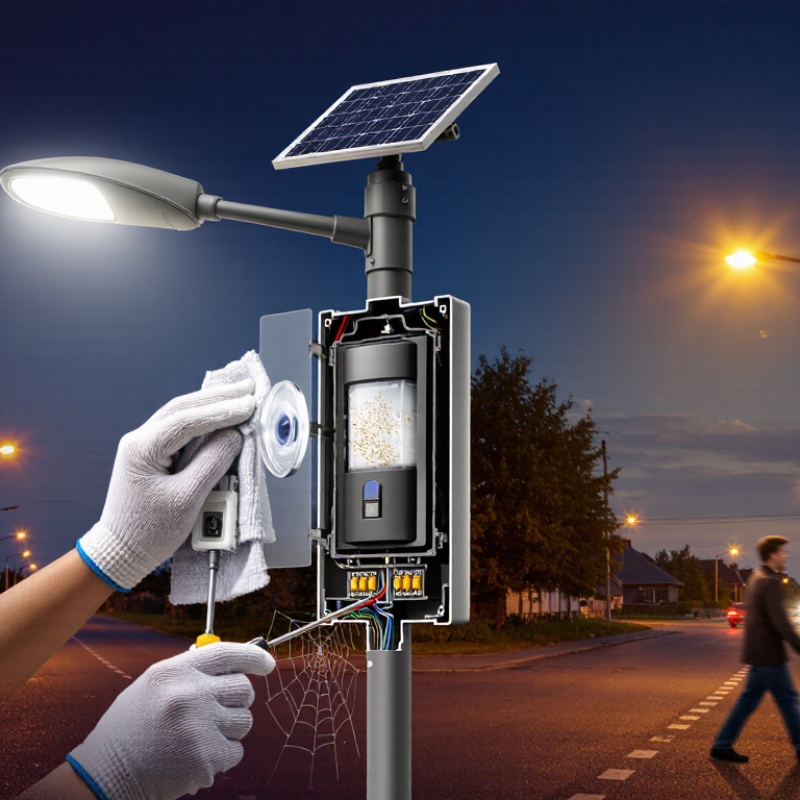
This guide explains How to fix a motion sensor on a solar street lamp, from cleaning the detector window to checking its settings, wiring, and power supply. Look for practical clues: a spiderweb across the lens, a connector loosened by vibration, or a sensor pointed at passing traffic. Work safely, and isolate power before handling exposed wiring. Small detail, big difference. I cannot verify a named industry expert’s exact quotation on this specific repair, so I will not invent one. A careful diagnosis is more trustworthy than a confident guess.
How to Fix a Motion Sensor on a Solar Street Light?

Understand How the Motion Sensor and Solar Light Work

How to Fix a Motion Sensor on a Solar Street Light?

A solar street light is a small energy system, not merely a lamp with a detector. Its panel charges a battery during daylight, while a controller manages stored power. At night, the controller usually activates the lamp at low output. The motion sensor then detects changes in infrared heat or movement and raises brightness. That relationship matters. A weak battery can look like sensor failure.

Begin with a daylight inspection. Clean dust, leaves, or bird marks from the solar panel and sensor lens. Check for loose wires, cracked covers, or moisture around the housing. Turn off the unit before touching its connections. At dusk, walk across the sensor’s view instead of directly toward it. Many passive infrared sensors detect side-to-side movement more reliably. They may not work through glass, thick plastic, or heavy rain.

Adjust sensitivity and delay settings carefully. Excessive sensitivity can trigger the lamp from moving branches, while low sensitivity may miss a person several meters away. Confirm that the light has entered night mode; bright nearby lamps can confuse its dusk sensor. I have seen technicians blame the sensor too quickly when the real issue was poor charging. If cleaning and adjustment fail, disconnect the battery briefly and reconnect it, following the unit’s instructions. A damaged cable or swollen battery needs qualified service, not repeated resets.

Inspect the Sensor, Wiring, Battery, and Solar Panel

How to Fix a Motion Sensor on a Solar Street Light?

A motion sensor can fail because of dirt, loose wiring, weak batteries, or poor charging. Start at dusk, when the light should activate. Wipe the sensor lens with a dry, soft cloth. Remove leaves, insects, and mud from its detection area. Check the detection angle and sensitivity settings. A sensor facing a busy road may trigger constantly. A sensor facing the ground may detect almost nothing. The International Energy Agency reports that lighting uses about 15% of global electricity. Accurate sensing can therefore reduce unnecessary operating time.

Inspect the cable from the sensor to the control box. Look for cracked insulation, water entry, corroded terminals, and loose screws. Turn off the system before tightening connections. Use a multimeter to check continuity, but do not guess the connector polarity. That mistake can damage the controller. If the sensor works only after a sunny day, test the battery voltage after sunset. A weak battery may power the sensor but not the lamp. Battery capacity also falls in cold weather and after repeated deep discharge.

Check the solar panel for shade, dust, and bird droppings. NREL’s PVWatts documentation confirms that irradiance and temperature strongly affect photovoltaic output. Clean the panel and compare its voltage with the controller’s specification. Do not replace the sensor immediately. Field maintenance often shows a charging fault behind an apparent sensor fault. My own troubleshooting preference is simple: test each part separately, record the readings, and question assumptions when the result seems too convenient.

How to Fix a Motion Sensor on a Solar Street Light? - Inspect the Sensor, Wiring, Battery, and Solar Panel

Inspection Area Common Symptom What to Check Practical Test or Measurement Typical Corrective Action Normal Reference
Sensor Lens and Housing The light does not react to movement or detects movement intermittently. Look for dust, mud, insects, water droplets, cracks, or physical blockage around the motion sensor. Inspect the lens in daylight and gently clean it with a soft, dry or slightly damp cloth. Clean the lens, dry the housing, reseal damaged cable entries, and replace a cracked sensor cover. The sensing window should be clear, dry, and free from shading.
Sensor Position and Coverage The light works only when a person is very close or fails to detect people crossing the road. Check whether the sensor points toward the intended walkway, road, or entrance and whether poles, branches, or signs block its field of view. Walk across the monitored area at different distances and angles, allowing several seconds between tests. Adjust the sensor angle, remove obstructions, and keep the sensor away from direct light sources or reflective surfaces. Detection range and angle vary by sensor; use the installed unit’s specification as the limit.
Daylight and Operating Mode The light does not turn on during the day, even when motion is detected. Determine whether the fixture is designed to activate only at night and check the dusk-to-dawn or operating-mode setting. Cover the light sensor completely or test after dark; avoid shining a flashlight directly at the photocell. Use the correct operating mode and ensure the photocell is not exposed to nearby artificial light. Many solar lights inhibit illumination during daylight to conserve stored energy.
Wiring and Connectors The sensor works after tapping the housing, or the light behaves inconsistently. Inspect plugs, terminals, cable insulation, crimp connections, corrosion, loose screws, and water ingress. With the system isolated, perform a visual inspection and a gentle cable movement test. Use continuity testing only when disconnected. Reconnect loose plugs, clean corrosion where appropriate, replace damaged cable, and protect joints from moisture. Connections should be secure, dry, strain-relieved, and free of exposed conductors.
Battery Condition The light flashes briefly, turns off quickly, or the sensor appears unresponsive at night. Check battery age, swelling, leakage, loose terminals, deep discharge, and whether the battery type matches the controller. After charging in good sunlight, measure the battery with a suitable meter and compare the reading with its nominal voltage and charge specifications. Tighten terminals or replace a degraded battery with the same chemistry, voltage, and approved capacity. A healthy battery should hold voltage under load; exact values depend on the battery chemistry and system design.
Solar Panel The light works after a sunny day but has little or no operation after cloudy weather. Check dirt, bird droppings, shading, cracks, loose mounting, cable damage, and incorrect panel orientation. Clean the panel and compare its open-circuit voltage or charging current with the panel’s rated specification under strong sunlight. Remove shading, clean the surface, repair connections, or replace a damaged panel or cable. The panel should receive unobstructed sunlight for the required daily charging period.
Controller and Settings The sensor detects movement, but brightness, duration, or response is incorrect. Review motion sensitivity, hold time, dimming level, low-voltage protection, and any remote or timer settings. Change one setting at a time and test the light after the controller enters nighttime operation. Restore suitable settings or reset the controller according to its technical instructions. Settings should match the required detection distance, lighting duration, and available battery energy.
Environmental Interference The light activates randomly or remains on without obvious movement. Look for moving branches, hot exhaust, reflective surfaces, animals, passing vehicles, and rapid temperature changes. Observe the area at night and temporarily shield likely sources without blocking the intended detection zone. Reposition the sensor, trim vegetation, reduce sensitivity, or adjust the detection direction. The sensor should respond mainly to movement within its configured detection area.
Final Functional Test The repair appears complete, but the problem may return later. Confirm sensor response, illumination level, battery charging, weather sealing, and cable strain relief. Test after dark from several directions, then recheck the system after a full sunny charging day. Record the settings and repair date, and monitor performance for several nights. The light should respond consistently at night and maintain operation according to its programmed schedule.
Safety note: Switch off the system before disconnecting wiring. Do not short-circuit the battery, puncture a battery enclosure, or work at height without suitable access equipment and personal protective equipment.

Adjust Sensor Settings and Remove Obstructions

How to Fix a Motion Sensor on a Solar Street Light?

Adjust Sensor Settings and Remove Obstructions

A faulty motion sensor often needs adjustment, not replacement. Check the sensor during daylight, when the lamp should remain off. Set sensitivity to a medium level, then walk across the detection zone. Walking directly toward the sensor may produce a weaker response. Adjust the angle slightly downward. Avoid pointing it toward roads, trees, or reflective walls. The U.S. Department of Energy reports that occupancy controls can reduce lighting energy use by 10% to 90%, depending on operating patterns. Solar lights need careful settings because unnecessary activation drains stored energy.

Clear the sensor lens and nearby panel. Dust, spider webs, leaves, and insects can interrupt detection. Trim branches that move across the sensing area. Check for plastic film left after installation. It happens more often than expected. Also inspect the panel for shade during charging hours. A weak battery can make a sensor appear defective. After cleaning, test the light at dusk and again after midnight. Adjust the hold time to about 30–60 seconds for pedestrian areas. Use a lower sensitivity setting if wind-blown foliage triggers the lamp. The International Energy Agency’s Energy Efficiency Market Report 2023 emphasizes better controls as a practical efficiency measure. Still, published savings estimates are not guarantees for every street. Temperature, mounting height, lens quality, and traffic patterns can change results. Document each adjustment, because guessing makes troubleshooting slower.

Test the Light and Replace Faulty Components

How to Fix a Motion Sensor on a Solar Street Light?

Start by checking the complete lighting system, not only the motion sensor. Clean dust from the solar panel and sensor lens with a soft, dry cloth. At dusk, cover the panel to imitate darkness, then walk across the detection area. The lamp should brighten within a few seconds. If nothing happens, inspect the battery connection, power switch, and cable joints. Loose terminals often look harmless but can stop the entire light.

Test the sensor in a controlled way. Keep the area clear of moving branches, vehicles, and reflective surfaces. Walk about three meters from different angles. Some sensors detect side movement better than direct movement. A multimeter can check battery voltage and continuity, but follow the light’s wiring diagram carefully. Disconnect power before touching terminals. I once replaced a sensor too quickly, then discovered a corroded battery connector was the real fault. That mistake was avoidable.

Replace the sensor if its lens is cracked, its wiring is damaged, or it gives no response after proper testing. Match the replacement’s voltage, connector type, detection range, and weather rating. Replace swollen batteries, burned LED drivers, or brittle cables as well. Install the new component firmly, seal exposed joints, and angle the sensor away from walls or hot surfaces. Test the light on three separate nights. One successful test is not enough. Temperature, battery charge, and passing animals can produce misleading results.

How to Fix a Motion Sensor on a Solar Street Light

Example post-repair test results: successful detections in five walk tests at each distance. These are illustrative readings, not universal sensor specifications.

Walk across the sensor’s field of view five times at each marked distance. If detections are inconsistent, check sensor alignment, wiring, and power before replacing a faulty component. Detection range varies by sensor and installation conditions.

Verify Operation After a Full Charging Cycle

After a full charging cycle, test the motion sensor at dusk, not under direct sunlight. Confirm the battery indicator shows normal charge, then cover the panel briefly or wait until ambient light falls below the lamp’s switching threshold. Walk across the sensor’s field at several distances. Note the trigger point, light-on time, and whether the lamp returns to dim mode. Repeat from the side; a sensor can detect a direct approach differently. Small detail, but important.

The U.S. Department of Energy’s lighting-controls guidance reports occupancy-sensor energy savings ranging from 10% to 90%, depending on use and installation. That wide range is a reminder: a sensor’s result depends on its real surroundings, not just its settings. Check for branches, signs, or warm surfaces that could affect detection. Let the lamp run through several detection cycles, then verify it still responds after a cloudy day or a short charge. Solar performance varies with weather, so one successful night is not proof. If the sensor stays on, adjust its sensitivity or timer one setting at a time, and record each change. I would not assume a factory setting is correct; it may simply have gone unnoticed.

FAQS

Why might a solar street light’s motion sensor stop working?

Dirt, loose wiring, a weak battery, or poor panel charging can cause problems. A quick lens wipe may help.

How should I clean the sensor?

Use a dry, soft cloth. Remove leaves, insects, and mud around its detection area.

What should I check if the light triggers constantly?

Check the sensor’s angle and sensitivity. A busy road or warm surface may cause unwanted triggers.

How can I inspect the sensor wiring safely?

Turn off the system before checking cables, terminals, and screws. Look for cracked insulation, moisture, or corrosion.

Why does the lamp work after sunny days but fail later?

The battery may be weak or undercharged. Cold weather and repeated deep discharge can reduce its capacity.

Could a solar panel problem look like a sensor fault?

Yes. Shade, dust, or bird droppings can reduce charging, making the sensor appear unreliable.

When should I test the motion sensor?

Test it at dusk after a full charging cycle. Walk across its detection area at different distances.

What should I record during testing?

Note the trigger distance, light-on time, and whether the lamp returns to dim mode. Small details matter.

What if the light stays on too long?

Adjust sensitivity or the timer one setting at a time. Record each change; factory settings may not suit the location.

Is one successful night enough to confirm a repair?

No. Test several cycles and check performance after cloudy weather. One good night proves little.

Conclusion

This guide explains How to fix a motion sensor on a solar street lamp by first understanding how the sensor, solar panel, battery, and light work together. Begin with a careful inspection of the sensor and its wiring, and check the battery and panel for damage, dirt, or loose connections. Then review the sensor’s settings, such as sensitivity and detection range, and remove objects that may block its view or trigger it unnecessarily.

After making adjustments, test the light by moving through the sensor’s detection area and checking whether it switches on and off as expected. If the problem remains, replace only components that are confirmed to be faulty, following the fixture’s instructions. Finally, allow the system to complete a full charging cycle and test it again at night. This helps confirm that the repair is reliable and that the light has enough stored power for normal operation.

Liam

Liam

Liam is a dedicated marketing professional with a profound expertise in the industry, where he excels at highlighting the unique advantages of our core products. With a keen understanding of market trends and consumer needs, Liam frequently updates our company’s professional blog, providing......